Loftie Clock: a phone-free bedside for calmer nights and mornings
This article contains affiliate links. We may earn a commission if you buy through them.
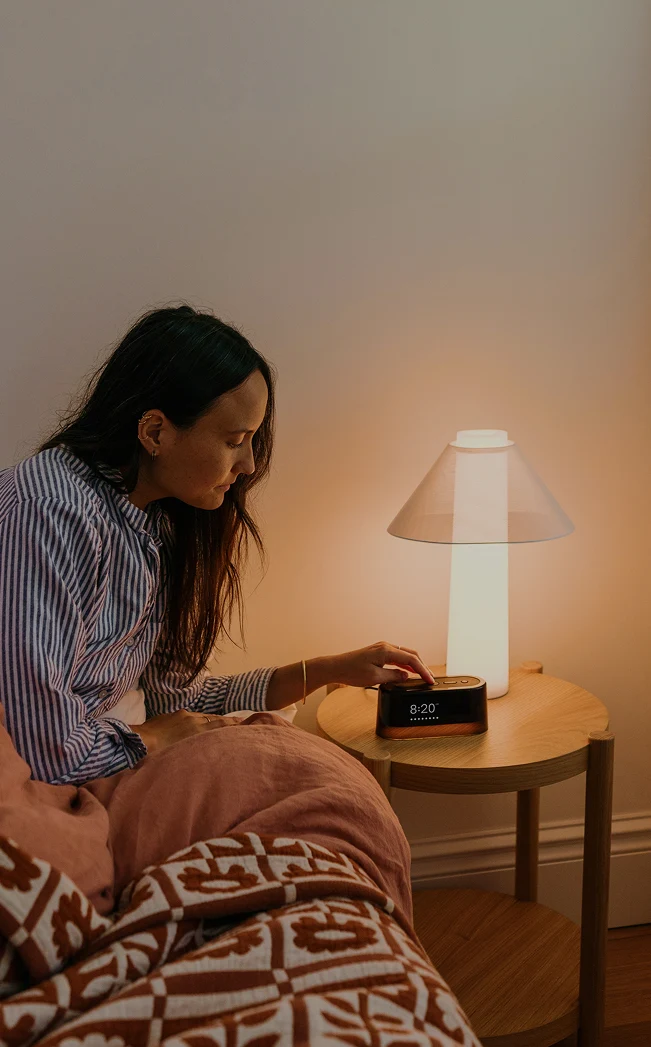
The Loftie Clock is designed for people who want their bedroom back from their phone. Instead of falling asleep to alerts and waking to a jolt, you may want a calmer routine: gentle sounds, fewer late‑night notifications, and a display you can dim to darkness until morning. A dedicated bedside device gives you those controls on the nightstand, so you don’t have to open your phone and get pulled into feeds just to set an alarm.
Why a phone-free bedside can improve your sleep routine
Moving your phone off the nightstand is a simple change with outsized effects: you reduce the temptation to check one more notification, and you avoid waking into a wall of alerts. Replace your phone on the nightstand and you also remove the blue‑white glow and endless feeds that keep your mind on daytime tasks. The idea is to make the bedroom supportive of winding down and waking up—without needing willpower at midnight.
That’s why a focused bedside device matters. Cut late-night notifications, keep a calmer wind-down is the promise behind Loftie’s approach. With scheduled app blocking in the free Loftie app and Drift proximity‑based blocking that’s built into the clock, distracting apps can stay quiet while you get ready for sleep. Instead of setting an alarm on your phone and getting sidetracked, you set it on the device, choose a sound from its on‑board library, and dim the display all the way down.
There is a tradeoff: your phone is familiar and does everything, but that convenience invites doomscrolling and late‑night interruptions. A purpose‑built clock narrows the choices on the nightstand to what helps you rest—sounds, light, time—and leaves everything else out of reach until morning.
The Loftie Clock: the features that matter nightly
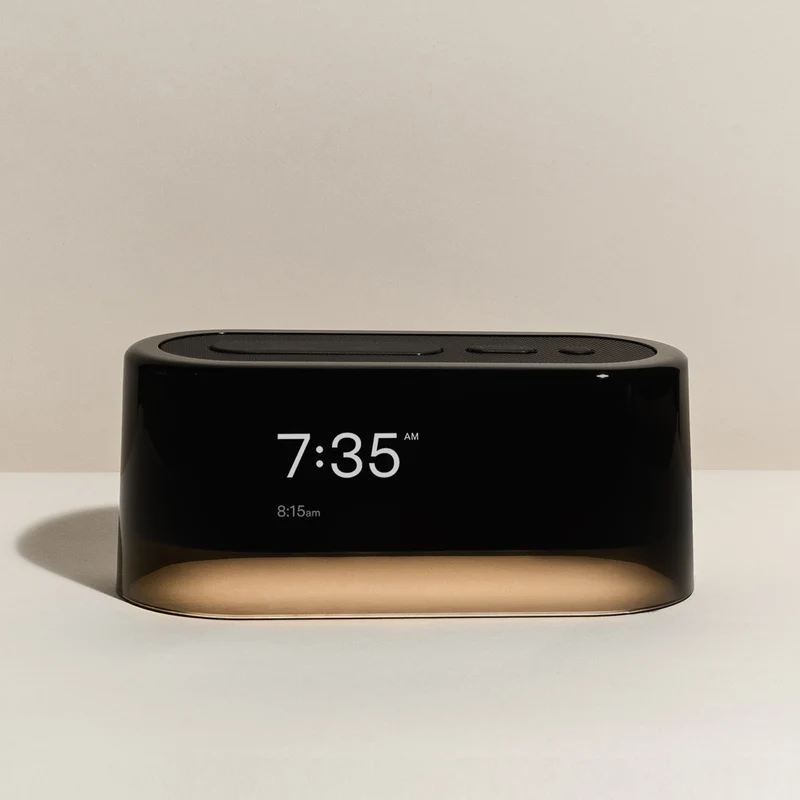
The heart of the setup is the Loftie Clock. Its value isn’t in a single spec; it’s in how several small design choices add up to a routine you can stick with: a gentler two‑phase alarm, on‑device audio with no paywall, Drift app blocking to reduce late‑night noise, and display and light controls that suit a dark bedroom.
Two-phase alarm, not a harsh buzzer keeps the wake‑up calm. No subscription or paywall means the clock’s sounds and features are included. And if you want to set it up and then go offline, you can Use No Wi‑Fi Mode after setup.
Two-phase alarm, explained
Loftie’s signature is a two‑phase alarm designed to help you transition from sleep without a jolt. Phase 1 is a brief, gentle cue that fades on its own so you can surface calmly; Phase 2 follows a few minutes later with a continuous, still‑soothing melody to make sure you actually get up. That structure matters if your current routine is either “snooze until panic” or “blast a harsh tone and feel wired.” With the Loftie Clock, you pick the interval—three, six, or nine minutes—and choose tones you’ll tolerate at dawn.
In practice, that means you don’t have to decide between “too soft to be useful” and “too loud for comfort.” You can keep Phase 1 quiet for a slow rise and let Phase 2 do the work of getting you out of bed. If you share a room, this can also reduce the chance that one startling sound wakes everyone at once.
Drift, Bed Signal and fewer notifications in the bedroom
Doomscrolling is often a cue problem: when the phone’s in your hand, it’s easy to slip into apps. Drift helps by changing the cue. It’s built into the Loftie Clock: step into the bedroom and the apps you chose can lock on their own until you leave, so bedtime isn’t competing with your feed. If you prefer a scheduled approach, the free Loftie app supports scheduled app blocking to keep distractions quiet until you’re ready.
For winding down, you can set a Bed Signal—a gentle nudge of light and sound—to mark the moment when evening tasks give way to pre‑sleep. Pair that with the Sleep Timer so wind‑down audio fades after you’ve drifted off, and you’ve turned several micro‑decisions into one simple routine.
When you’re ready to see everything in context and decide which features matter for you, you can visit Loftie to explore the clock’s options and examples.
Sounds, nightlight and No Wi‑Fi Mode
The clock stores 100+ science‑backed sleep sounds and wellness tracks with no paywall. You listen on‑device or via app—no subscription to unlock basics. You can dim the display down to a full black‑out and use Red Mode to avoid blue‑white glow. A built‑in nightlight offers just enough light to find the bathroom without waking you fully; the Sleep Timer handles fade‑outs automatically.
Setup uses the app once, then it’s your choice. After the initial connection and any updates, enable No Wi‑Fi Mode and manage alarms, brightness, sounds and the nightlight on the device itself. The clock should stay plugged in for everyday use; a backup battery covers short outages for several hours.
If you like to keep things offline while you sleep but still want flexible controls and a generous audio library, this blend of on‑device features is what makes the Loftie Clock feel different from using a phone alarm.
How it compares to phone alarms and sunrise-only options
Compared with a phone alarm, the difference starts with where the choices live. With a phone, opening your alarm also opens a gateway to messages and feeds. With Loftie, you set alarms, pick sounds, and control brightness on the device. You also get a complete black‑out display and a built‑in nightlight for low, warm guidance at 3 a.m. No Wi‑Fi mode and on-device controls reinforce that you don’t need the internet to fall asleep.
What about sunrise alarms? The Loftie Clock is sound‑first; it’s not a sunrise alarm. If light‑first wake‑ups matter to you—because you find light cues more pleasant or you’re trying to wake before opening your eyes—Pair with a sunrise lamp if light-first wake-ups matter. The Loftie Lamp adds true sunrise simulation and sunset dimming, and it can sync with the clock for combined light‑and‑sound routines. If you only need a sound alarm with a blackout display, the clock alone fits the brief.
In short: choose the clock if you want a phone‑free, sound‑led routine with on‑device audio and Drift app blocking; add a sunrise light later if you discover that light cues would help you wake more consistently.
A worked example: set up a calmer night and morning
Here’s a hypothetical week to show how the pieces fit without adding friction. Night one, pick a reasonable wake‑up and set a two‑phase alarm on the Loftie Clock: a soft sound for Phase 1, a slightly brighter tone for Phase 2 six minutes later. Turn on the Bed Signal for 10:15 p.m. so a gentle cue nudges you to close the day. Choose one wind‑down track—say, rain or a short meditation—and set the Sleep Timer for 30 minutes so it fades without you reaching for your phone.
Midweek, enable Drift so your chosen apps lock when you enter the bedroom. If you still tend to check the time at night, set the display to black‑out and use the built‑in nightlight to navigate without turning on overhead lights. Spend a minute each evening dialing in volume and brightness—just enough to hear Phase 1 and see the nightlight, not enough to wake a partner.
By the weekend, decide if you need light cues too. If mornings feel better already, keep the clock‑only setup. If you suspect a sunrise would help, consider adding a Loftie Lamp to pair light with the clock’s Phase 1 tone. Start small and adjust over a week: change one setting at a time, give it a few nights, and keep the phone on a charger across the room to support the habit.
When to add Loftie Lamp or Night Lights
Some routines benefit from light cues as much as sound. Loftie covers both ends of the spectrum: a sunrise‑capable lamp you can pair with the clock, and warm, ultra‑low night lights for hallways, bathrooms, and nurseries. The key is to add only what you’ll use—light devices increase cost and setup complexity, so match them to a clear need.
Bring sunrise and softer evenings with Loftie Lamp
If you want dawn‑style wake‑ups and gentler evenings, the Loftie Lamp brings both. It simulates sunrise for wake‑ups and fades like a sunset at night; you can choose preset Day, Reading, and Night modes or customize colors and gradients. Crucially, it can pair with the Loftie Clock so your light and sound cues sync. That’s helpful if you wake more easily to light than to audio alone. The lamp uses Wi‑Fi for alarms and custom light settings, so plan to connect it during setup. Light-first wake-ups with Loftie Lamp are a practical upgrade when you want mornings to feel brighter without opening your phone.
Tradeoff: adding a lamp means one more device to place and configure. If you share a room and your partner prefers it dark, consider keeping sunrise brightness modest and relying on the clock’s Phase 2 tone to finish the job.
Keep pathways visible with warm, low light
Path lighting should be just bright enough to guide you without telling your brain it’s morning. Loftie’s Night Lights emit a warm amber or 100% red glow—both friendlier to melatonin than typical blue‑white LEDs—and they turn on at dusk and off at dawn automatically. That makes them well‑suited to bathrooms, hallways, nurseries, and guest rooms where you want set‑and‑forget guidance without harsh illumination. Warm amber guidance at night helps you move around safely and go back to bed without lighting up the whole house.
Because the night lights are plug‑in and light‑sensing, you place them once and let them run. If your pathways are already safe and familiar, you may not need them. But if you currently switch on overhead lights during nighttime trips, this is a small, low‑glare fix.
Setup, Wi‑Fi and living with less screen time
Setup is straightforward: use the Loftie app once to connect the clock, load updates, and confirm time. Then you can manage alarms, sounds, brightness, and the nightlight right on the device—and enable No Wi‑Fi Mode if you prefer staying offline at night. App required only for setup, and there are No subscription costs: the sound library and features are included with the clock.
Connectivity specifics matter. The clock supports a 2.4 GHz Wi‑Fi connection for setup and updates; if your router only broadcasts 5 GHz, enable a 2.4 GHz network or create a temporary 2.4 GHz access point during setup. Day to day, keep the clock plugged in; the backup battery covers several hours if the power blips.
If you want app blocking beyond the bedroom, the Loftie Card adds a tap‑to‑block control you can use anywhere: choose apps in the app, tap the card to start, and tap again to end. It’s a separate tool, but it complements the clock’s Drift by extending phone‑free time into the rest of your day.
What to know about trial, returns and eligibility
Before you commit, cover the basics. The Loftie Clock ships free in the U.S., includes a 30‑night trial, and is backed by a 1‑year warranty. U.S. returns are accepted within 30 days from delivery; items should be in like‑new condition and returned in their original packaging. If you use HSA/FSA funds, Loftie partners with Truemed so qualified customers can pay with pre‑tax dollars at checkout.
Policies can change, and eligibility varies by person and plan, so confirm the current terms on the official store during checkout. Keep accessories and packaging until you’ve decided to keep the device—that makes exchanges or returns much easier if you need them.
30-night trial and 1-year warranty and HSA/FSA eligible for qualified buyers give you room to test the routine in your real bedroom.
Is the Loftie Clock right for your bedside?
If your goal is a calmer, phone‑free bedside routine—with a gentle, sound‑first wake‑up and an on‑device audio library with no paywall—the Loftie Clock fits that brief. If light‑first mornings are essential, add the Loftie Lamp for sunrise simulation; if audio and a blackout display are all you want, keep it simple. Choose Clock now; add Lamp if you want sunrise.
One practical next step: confirm you can connect to 2.4 GHz Wi‑Fi for setup, pick one Phase 1 tone and one Phase 2 tone you’ll accept at dawn, and decide whether you’ll enable Drift on night one. If that feels right, visit Loftie to look over the clock and, if needed, the lamp. Build your routine with the minimum you’ll actually use—then adjust across a week.